Wi-Fi or Ethernet for PS5 and Xbox: Which Is Better for Downloads?
Your plan may say 500 Mbps, but what your console gets depends on how it is connected. The two main choices are a cable and Wi-Fi. For a very large download, such as the GTA 6 preload that opens on November 12, 2026 for digital buyers, the choice can save you hours. Rockstar has not published an official install size, so it is wise to plan for a big one.
The short answer
For large downloads, Ethernet is usually the better choice. It is steadier, because nothing in the air can interfere with it. Microsoft's support guidance for slow Xbox downloads starts with the same advice: if you can, connect the console to the router with a cable.
Sony's connection setup page presents Wi-Fi and a LAN cable as two options and does not rank them. Both console makers support both, and a good Wi-Fi connection can be fine. The difference shows up when the signal is weak or crowded.
Why Wi-Fi can slow downloads
- Interference. Other networks and other devices share the airwaves. Microsoft points out that a console on Wi-Fi may be competing with them.
- Distance and obstacles. Walls, floors and large objects weaken the signal.
- Other devices. Phones, TVs and computers all use the same connection.
None of these affect a cable in the same way.
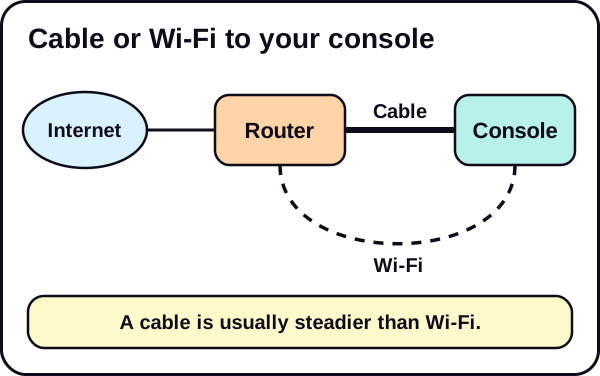
How to connect with a cable
You need an Ethernet cable long enough to reach from your router to the console. A basic Ethernet cable is enough for most homes. We may earn a commission; see our affiliate disclosure.
PS5: plug the cable into the LAN port, then go to Settings, then Network, then Settings, choose Set Up Internet Connection, then Set Up Wired LAN, and select Connect.
Xbox: plug the cable into the console and your router. The console normally detects a wired connection on its own. Then run a speed test to check the result.
If you cannot use a cable
Not everyone can run a cable across the house. If you must use Wi-Fi, these steps help:
- Use the 5 GHz band if your router has one. Microsoft suggests putting the console on 5 GHz and other wireless devices on 2.4 GHz. The 5 GHz band has a shorter range but often has less interference.
- Move the console closer to the router, or the router closer to the console.
- Keep the router in the open, not in a cabinet.
- Pause other devices that are using the network while you download.
If Wi-Fi is the problem for the whole house, a Wi-Fi router or a mesh system may help. Try the free fixes first.
A quick way to decide
| Your situation | A sensible choice |
|---|---|
| The console is near the router | Use a cable |
| The console is in another room and a cable is practical | Use a cable |
| A cable is not practical | Use 5 GHz Wi-Fi and get closer |
| Speeds are far below your plan on Wi-Fi | Try a cable to find out whether Wi-Fi is the cause |
Test the difference yourself
The best answer for your home is a measurement. Run a speed test on Wi-Fi, then connect a cable and run it again. Our guide on how to test your internet speed on PS5 and Xbox shows how. If the cable gives a clearly better result, keep it.
If a cable gives you far less than your plan, the issue is probably your router, modem or provider, not Wi-Fi.
A note on newer consoles and routers
Sony notes that on the PS5 Pro, if you have connection problems you can try connecting with and without Multi-Link Operation. That is a Wi-Fi feature on some routers. It is a troubleshooting step, not something you need to change if your connection works.
Common mistakes
- Judging by the plan, not the test. The only way to know what your console gets is to measure it.
- Putting every device on the same Wi-Fi band. On a dual-band router, give the console the 5 GHz band if your other devices can use 2.4 GHz.
- Leaving the router in a closed cabinet. Walls and objects weaken the signal.
- Expecting a cable to beat your plan. A cable helps you reach your plan speed more reliably. It cannot go beyond it.
- Changing advanced settings without need. Both console makers advise leaving them alone unless you know what they do.
Before the preload
- Pick the steadiest connection you can: a cable if possible.
- Test it, and compare it with your plan.
- Read the preload timeline and see how long a download takes at each speed.
The short version
- Ethernet is usually steadier than Wi-Fi for large downloads.
- If you must use Wi-Fi, use 5 GHz and get closer to the router.
- Test both and keep the better one.
See our Network & Download Speed hub and the PS5 download speed fixes.
We update this guide when console makers change their advice.
Frequently asked questions
Is Ethernet faster than Wi-Fi?
Not always faster, but usually steadier. A cable avoids interference, so you tend to get your plan speed more consistently.
Do I need a special cable?
A standard Ethernet cable is enough for most homes. Check that it is in good condition and long enough to reach your router.
What if my console is far from the router?
Move the router or console closer, use the 5 GHz band, or consider other ways to improve your network. Try the free fixes first.
Does this matter for the GTA 6 preload?
It can. Rockstar has not published the install size, so assume a large download and give yourself the steadiest connection you can.