How Long Will the GTA 6 Download Take? Time by Internet Speed
In this guide (16 sections)
Everyone wants to know how long the GTA 6 download will take. The honest answer is that Rockstar has not published an official install size, so there is no real number yet. What we can do is show you how download time scales, so you can read the answer for yourself once the size is known.
GTA 6 launches on November 19, 2026, with preload from November 12 for digital buyers.
The quick way: use the calculator
Enter a game size in GB and your speed in Mbps in our download time calculator. Try several sizes. It takes ten seconds.
Download time by speed (example sizes)
The sizes below are examples, not predictions. They show how time changes with size and speed, assuming your connection runs at its full plan speed the whole time. Real downloads are often slower.
| Your speed | 100 GB | 150 GB | 200 GB | 250 GB |
|---|---|---|---|---|
| 25 Mbps | 8 h 53 m | 13 h 20 m | 17 h 47 m | 22 h 13 m |
| 50 Mbps | 4 h 27 m | 6 h 40 m | 8 h 53 m | 11 h 07 m |
| 100 Mbps | 2 h 13 m | 3 h 20 m | 4 h 27 m | 5 h 33 m |
| 200 Mbps | 1 h 07 m | 1 h 40 m | 2 h 13 m | 2 h 47 m |
| 300 Mbps | 44 m | 1 h 07 m | 1 h 29 m | 1 h 51 m |
| 500 Mbps | 27 m | 40 m | 53 m | 1 h 07 m |
| 1,000 Mbps | 13 m | 20 m | 27 m | 33 m |
Times are rounded to the nearest minute.
How to read the table
- Find your real speed from a speed test, not the number on your bill.
- Pick the column nearest to the size you expect.
- Add a margin. If you only get half of your plan speed, double the time.
If the official size lands between two columns, estimate between them, or use the calculator for an exact figure.
The formula behind it
Download time follows a simple rule:
time in seconds = size in GB × 8,000 ÷ speed in Mbps
One gigabyte is about 8,000 megabits, because a byte is 8 bits and a gigabyte is about 1,000 megabytes. For example, 200 GB at 100 Mbps is 200 × 8,000 ÷ 100 = 16,000 seconds, which is 4 hours and 27 minutes. That matches the table.
Mbps versus MB/s
This trips up many people. Internet plans use megabits per second (Mbps). Files and consoles often show megabytes per second (MB/s). Divide Mbps by 8 to get MB/s. A 100 Mbps plan tops out at about 12.5 MB/s.
Why your real time may be longer
The table is a best case. These things can slow you down:
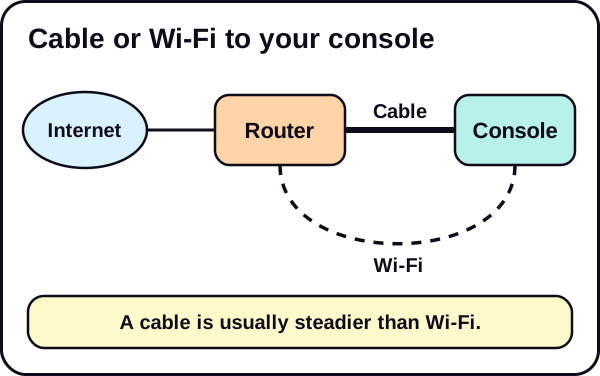
- Wi-Fi. Distance, walls and interference lower speed. A wired connection is steadier.
- Other devices. Streaming, video calls and other downloads share your bandwidth.
- Your provider. Speeds can drop at busy times.
- The console. Some consoles cannot reach the full speed of a very fast plan.
- The server. When many players download at once, the source may limit your speed.
If your speed is below what you pay for, see how to speed up your PS5 download speed. Most of those tips also apply to Xbox.
Three worked examples
These use the same example sizes as the table. They are not GTA 6 predictions.
Example 1: a 100 Mbps home plan, 150 GB. The table says 3 h 20 m at full speed. If Wi-Fi gives you about half of that, plan for about 6 h 40 m, which means starting the preload in the evening and leaving the console on overnight.
Example 2: a 500 Mbps plan on Wi-Fi, 200 GB. The table says 53 m at full speed. Wi-Fi rarely delivers the whole plan to a console, so a real result could be well over an hour. A cable would get you much closer to the table.
Example 3: a 25 Mbps rural line, 250 GB. The table says 22 h 13 m. At that speed, start on the first day of preload and do not use the connection for anything else, or the wait stretches further. This is the case where the preload matters most.
Download time is not the whole wait
The download is the big part, but not the only part.
- Installation. After the files arrive, the console may need extra time to install or verify them. Rockstar has not described how long that takes for GTA 6, and it can differ by console.
- Updates. A patch after release adds another download. Its size is unknown.
- Pauses. If you pause to use the connection for something else, the total time grows.
Treat the table as the minimum, then add margin for these.
Check for data limits
A download this large uses a lot of data. If your plan has a monthly data cap, check it before you start. Some providers throttle speeds or add charges after a limit. Also remember that every other person at home draws from the same allowance. If you share a plan with others, a heavy week of downloads can affect them too.
Upload speed does not matter here
Your plan lists a download speed and an upload speed. For downloading a game, only the download number counts. Do not compare your upload number with the table.
Connection type matters
Different connection types behave differently in practice:
- Fibre and cable are usually steady, and a wired connection to the console gets close to the table.
- Mobile or home wireless internet can be fast but varies a lot with signal and time of day, so build in more margin.
- Satellite and older copper lines tend to be slower and less steady, so plan for the longest times.
If your speed varies a lot, test it at several times of day, and plan around the slower result.
What the preload changes
A preload lets you download before launch, so the wait does not hurt launch day. If you bought digitally, you can start on November 12. See GTA 6 preload: start date, download time and how to prepare for the full timeline.
The physical edition is a box with a download code, not a disc, so it still needs a download. Read what that means.
Do not forget storage
A fast connection does not help if the file does not fit. Check your free space first, and see how to plan in how much storage you need for GTA 6 on PS5. If you need room, use our guide to clear space on PS5.
Which row of the table should you use?
If you are not sure about your speed, run a test at different times of day. Evenings are often slower than mornings, and Wi-Fi is often slower than a cable. Use the lower result, because that is the one you are most likely to live with.
A quick checklist
- Run a speed test and note the result.
- Use the table or the calculator to see a range.
- Add a margin for real-world conditions.
- Fix your connection if it is slower than expected.
- Free space before November 12.
The short version
- The GTA 6 size is not published, so time cannot be known yet.
- Use the example table, the formula or the calculator.
- Real speed is usually lower than plan speed, so add a margin.
See the Storage & Downloads hub for more.
We update this guide when Rockstar confirms the file size.
Frequently asked questions
How long will the GTA 6 download take?
It depends on the install size, which Rockstar has not published, and on your real speed. The table on this page shows examples for sizes of 100 to 250 GB.
Are the sizes in the table the real GTA 6 size?
No. They are example sizes so you can see how time scales. They are not predictions.
Why is my real download slower than the table?
The table assumes your full plan speed all the time. Wi-Fi, other devices, your provider and the console's own limits can lower it.
What is the difference between Mbps and MB/s?
Mbps means megabits per second. MB/s means megabytes per second. A byte is 8 bits, so divide Mbps by 8 to get MB/s.
Can I start the download before launch?
Digital buyers can preload from November 12, 2026, a week before the November 19 launch.