GTA 6 Preload: Start Date, Download Time and How to Prepare
Here is what is confirmed about the GTA 6 preload, what is still unknown and what you can do now.
What is confirmed
- GTA 6 launches on November 19, 2026 on PS5 and Xbox Series X|S.
- No PC version has been announced.
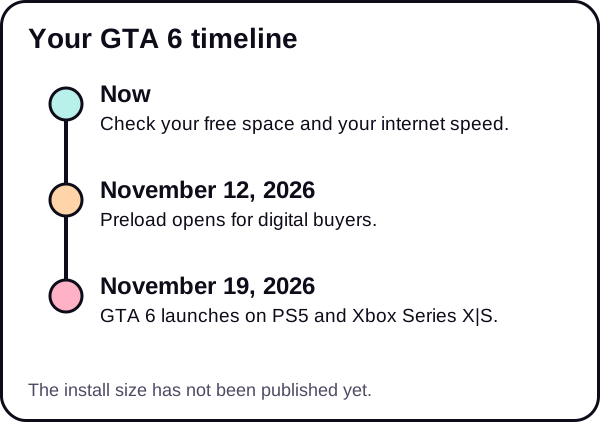
- Digital buyers can preload from November 12, 2026, one week before launch.
- The physical edition is a box with a download code, not a disc. See what that means.
What is not confirmed
- The install size. Rockstar has not published it. Any number you have seen is a guess.
- The exact time of day the preload opens. We will add it if it is officially stated.
- The size of any day-one update.
What a preload is
A preload lets you download the game before launch, so you can start playing when it unlocks instead of waiting for a huge download. You buy the game digitally, then the files download ahead of time. The game stays locked until launch.
That matters most for a game this large, because your launch-day speed may be slower than usual when many people download at once.
Why you should still prepare
Even without the size, you can do three things now.
1. Make room
You need free space for the whole install. Rockstar has not said how much, so aim for more than you think. Our guides for PS5 and for Xbox Series X|S walk you through it.
To see where you stand, check your usable storage. It is 667 GB on the original PS5, about 842 GB on the PS5 Slim and about 1.89 TB on the PS5 Pro. On Xbox, it is 802 GB on the Series X and 364 GB on the 512GB Series S.
2. Know your download speed
Time depends on size and speed. Your internet plan lists a speed in megabits per second (Mbps), but file sizes are in gigabytes (GB). Because a byte is eight bits, a plan of 100 Mbps moves at most about 12.5 megabytes each second under perfect conditions, and real speeds are usually lower.
Run a speed test on the device you use for the console, then try our download time calculator. For a quick table by speed, see how long the GTA 6 download will take.
How to estimate it yourself. Download time is the size in megabits divided by your speed in megabits per second. One gigabyte is about 8,000 megabits. As an example, a 100 GB download at 100 Mbps takes about 8,000 seconds, which is roughly 2 hours and 13 minutes, if your connection stays at full speed. That is only an example, not the GTA 6 size. Real speeds are often lower than the plan speed, so add a margin.
What changes the result. Wi-Fi signal, other devices using the network, the time of day and the console itself can all lower your speed. A wired connection is usually steadier than Wi-Fi.
3. Improve your connection
If your speed is lower than you expect, there are fixes. Our guide on how to speed up PS5 download speed covers wired connections, Wi-Fi and router settings. Most of those tips also help on Xbox.
Digital or physical: which should you choose?
Both end with a download, so your preparation is the same: free space and a good connection. The digital edition is bought in a store and downloads straight to the console. The physical edition is a box with a download code, so it does not remove the download. Choose by what you value, such as gifting, collecting or buying from a retailer, and not by hoping to skip the wait.
A preparation timeline
| When | What to do |
|---|---|
| Now | Check free space and your speed |
| By early November | Clear space and fix connection problems |
| November 12 | Start the preload if you bought digitally |
| November 19 | Launch day: make sure the game is ready to unlock |
Common questions about timing
Will my console download in the background? On PS5, yes, if you allow it. Sony says to go to Settings, System, Power Saving, Features Available in Rest Mode, and turn on Stay Connected to the Internet. For updates, you can also turn on Auto-Download in Settings, Saved Data and Game/App Settings, Automatic Updates. On Xbox, background downloads depend on your power settings, and the setting names differ between system versions, so check your console's power options.
Should I preload on the first day? If your connection is steady, yes. You get the files ahead of time. If many players download at once, speeds may drop, but you have a full week.
What if the download fails? Pause and resume it, restart the console and check your connection. We will publish a dedicated fix guide in the Fixes & Errors section.
Physical edition and the preload
The physical edition is a box with a download code. Rockstar has not said whether code holders can preload at the same time. We will update this page when it is stated officially. Until then, treat the November 12 date as confirmed only for digital buyers.
The short version
- Preload: November 12, 2026, digital buyers. Launch: November 19, 2026.
- Install size: not published.
- Prepare now: free space, test your speed and fix your connection.
For a full plan, see the GTA 6 setup checklist and our Storage & Downloads hub.
We update this guide when Rockstar confirms the file size.
Frequently asked questions
When does the GTA 6 preload start?
Digital buyers can preload from November 12, 2026.
When is GTA 6 released?
November 19, 2026, on PS5 and Xbox Series X|S. No PC version has been announced.
How long will the download take?
It depends on the install size, which Rockstar has not published, and on your speed. Use our calculator with a few sizes to see a range.
Can physical edition buyers preload?
The physical edition is a box with a download code, not a disc. Rockstar has not said whether code holders get the same preload timing, so check official announcements.
Do I need to be online on launch day?
Preloading downloads the game files in advance, but you should expect to be online around launch. Check Rockstar's official notes closer to the date.