How to Free Up Storage on Xbox Series X/S Before GTA 6
The GTA 6 preload opens on November 12, 2026 for digital buyers, and launch is November 19. Rockstar has not published an official install size, and the Xbox Series S 512GB model has only 364 GB usable, so it is worth freeing space early. The Xbox Series X has 802 GB usable.
This guide covers both consoles in a safe order.
Before you uninstall anything
- Check how much you have free. Our guide on how to check free storage on any PS5 or Xbox shows how.
- Know your console's ceiling. That is 802 GB on the Series X and 364 GB on the 512GB Series S.
- Stay signed in and online. Microsoft says the data for your games, including saved games, syncs online when you sign in, so a reinstalled game can bring your progress back. If you care about a game's progress, play a short session, quit the game and let the console sync before you uninstall it.
If a game matters to you and you are unsure about its saves, keep it installed for now.
Step 1: See what is taking the space
Press the Xbox button to open the guide, then go to Profile & system, Settings, System and Storage devices to see how much space is used and free. To see your installed games, open My games & apps from the guide and choose See all, then Games. A few large games usually use most of the space.
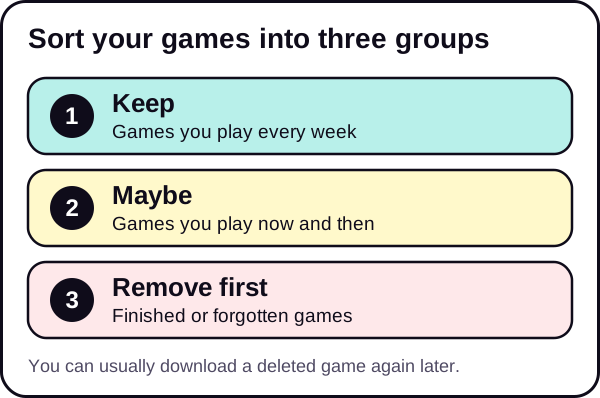
Sort your games into three groups:
- Play every week. Keep.
- Play now and then. Candidates to uninstall.
- Finished or forgotten. Uninstall first.
Step 2: Uninstall games you do not play
Start with the largest games you do not play. This frees the most space with the fewest steps.
In My games & apps, highlight the game, press the Menu button (the one with three lines) on your controller, choose Manage game and add-ons, and then Uninstall all. Confirm when asked.
Uninstalling does not delete your purchase. You can download the game again later from the Ready to install list in My games & apps.
Step 3: Clear captures
Screenshots and game clips add up, especially video.
- Press the Xbox button, then go to My games & apps, See all, Apps and Captures.
- Select the captures you want to keep and back them up to OneDrive or to an external drive. Microsoft's announcement of this feature also says you can set a new capture location in Storage devices in the settings.
- Delete the originals from the console.
Step 4: Look for other large items
Check apps, demos, beta builds and old items that you do not use. Remove them before launch week.
Step 5: Decide what stays for launch week
Think about what you will really play from November 12 onward. Everything else can be reinstalled later.
Step 6: Check the result
Check your free space again. Compare it with big games you already have. If GTA V Enhanced or Red Dead Redemption 2 is installed, look at their size, as they are the closest real references. GTA 6 is a new game, so plan for more than you think.
What to uninstall first
Use this order if you are not sure where to start.
| Priority | What | Why |
|---|---|---|
| 1 | Large games you have finished | Biggest space saving, no regret |
| 2 | Games you have not opened for months | You can reinstall them later |
| 3 | Demos, trials and betas | Often forgotten |
| 4 | Old captures and clips | Video adds up quickly |
| 5 | Apps you do not use | Smaller, but they count |
Common mistakes to avoid
- Waiting until preload day. If the download stops for lack of space, you lose time. Clear space ahead.
- Uninstalling a game with unsynced progress. Check your saves first.
- Filling the console to the last gigabyte. Leave room for updates and system use.
- Forgetting captures. They are easy to overlook, and they can be large.
- Deleting what you will play at launch. Keep what you will play in the same week, and remove something else.
How much is "enough"?
Rockstar has not published the size, so the best approach is to compare. Find the largest game installed on your console, and make sure you can free clearly more than that. If the official figure turns out to be larger, you will already know what to remove next, and the second round takes minutes.
Series S owners: be stricter
On the 512GB Series S, 364 GB is not much. If the final GTA 6 size is large, you may need to keep very little else installed. Our dedicated guide on the GTA 6 file size on Xbox Series S explains how to plan.
A week-by-week plan
- This week: check free space and uninstall finished games.
- Next week: clear captures and remove demos and unused apps.
- Week of November 5: check free space one more time and test your connection.
- November 12: start the preload if you bought digitally.
Spreading it out means no single session feels like a chore, and you still have time to fix surprises.
If you still need more room
- Wait for the official size so you know your target.
- Add storage. Xbox Series X|S consoles support a dedicated storage expansion card. Compare the options in our guide to external drives on PS5 and Xbox. To check what is available, see an Xbox storage expansion card. We may earn a commission; see our affiliate disclosure.
- Rotate games and keep only what you play now.
Do not forget the download
A preload needs time as well as space. Use the download time calculator, and see GTA 6 preload: start date, download time and how to prepare. If your speeds are low, our PS5 download speed fixes include general network tips that also apply to Xbox.
The short version
- Check, sort, uninstall, clear captures, check again.
- 802 GB usable on Series X, 364 GB on the 512GB Series S.
- Rockstar has not published the GTA 6 size, so plan for more.
See the Storage & Downloads hub and the GTA 6 setup checklist.
We update this guide when Rockstar confirms the file size.
Frequently asked questions
Will I lose saves if I uninstall a game on Xbox?
Uninstalling removes the game files. Saves are normally kept in the cloud if cloud saves are on, but confirm before you uninstall a game you care about.
How much usable storage do the Xbox consoles have?
The Xbox Series X has 802 GB usable. The 512GB Xbox Series S has 364 GB usable.
Can I reinstall games I uninstall?
Yes, as long as you own them. You will need to download them again, which takes time and data.
How much do I need to free for GTA 6?
Rockstar has not published the size, so there is no official number. Free as much as is practical and compare with big games installed.