How to Speed Up PS5 Download Speed: 10 Fixes That Work
Slow downloads are annoying all the time, but they matter most before a huge launch. The GTA 6 preload opens on November 12, 2026 for digital buyers, and launch is November 19. Rockstar has not published the install size, so the best preparation is a connection that is as fast and steady as it can be.
These ten fixes go from easiest to hardest. Try them in order and re-test after each one.
Fix 1: Test your connection
You need a baseline before you change anything.
- On your PS5, open Settings, then Network, then Connection Status.
- Choose Test Internet Connection.
- Note the download speed it reports.
Also run a speed test on a phone or computer on the same network. If the PS5 is much slower than the other device, the problem is local, such as Wi-Fi or the console. If both are slow, the issue is your plan or provider.
Fix 2: Use a wired Ethernet connection
A cable removes interference and usually gives the steadiest speed. Plug an Ethernet cable from the router to the PS5. You will often see a bigger improvement from this than from any setting.
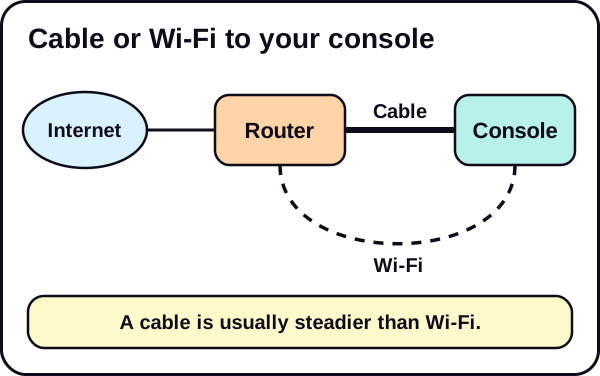
If you need a cable, a basic Ethernet cable is enough for most homes. We may earn a commission; see our affiliate disclosure.
Fix 3: Improve your Wi-Fi if you cannot use a cable
- Move closer to the router, or move the router closer to the console.
- Reduce obstacles. Walls, floors and large objects weaken the signal.
- Use the 5 GHz band if your router offers it. It is usually faster at short range. The 2.4 GHz band reaches farther but is often slower and more crowded.
- Keep the router in the open, not inside a cabinet.
If Wi-Fi is the bottleneck for the whole house, a Wi-Fi router or a mesh system may help, but try the free fixes first.
Fix 4: Restart your router and console
It sounds basic, and it works more often than people expect.
- Turn off the PS5 completely, not just rest mode.
- Turn off your modem and router. Sony's guidance is to leave them off for about five minutes, then turn them back on.
- Wait for it to reconnect, then turn the PS5 back on.
- Test again.
Fix 5: Pause other devices
Streaming, video calls, cloud backups and other downloads all share your bandwidth. Pause them while the PS5 downloads, especially on a slow plan. Check phones, TVs and computers in the house.
Fix 6: Pause and resume the download
Sometimes a download gets stuck with a slow link to the server. Pause it, wait a few seconds, then resume. This can pick a better connection.
On PS5, open the control center, go to Downloads/Uploads, select the game download, then choose Pause and later Resume. If it still will not move, Sony suggests choosing Cancel and Delete and then downloading the game again from your Game Library.
Sony also suggests two other checks when a download stalls: look at the PlayStation Network status page for outages, and make sure your system software is up to date in Settings, System, System Software, System Software Update and Settings.
Fix 7: Do not use the console heavily while downloading
If you play online or stream while the PS5 downloads, both compete for your connection. Let the download run first. If you want to leave it overnight, you can use rest mode, as long as the console is set to keep downloading. Go to Settings, System, Power Saving, Features Available in Rest Mode, and turn on Stay Connected to the Internet.
Fix 8: Try a different DNS
DNS is the system that turns web addresses into locations. A slow DNS can make connections start slowly. Switching to another public DNS service can help some people. It does not raise your plan speed.
- Open Settings, then Network, then Settings.
- Choose Set Up Internet Connection and pick your connection.
- Choose Advanced Settings, then set DNS Settings to Manual.
- Enter the primary and secondary DNS addresses from the provider you choose.
Sony's own advice is that if you are not familiar with these settings, you should ask your internet provider first.
Re-test afterwards. If nothing improves, switch back to automatic.
Fix 9: Check your router and its firmware
Old firmware can cause problems. Log in to the router, or use its app, and check for updates. Also check whether another setting limits speed for some devices. Settings differ by router, so follow your router maker's guide.
Fix 10: Check your plan and your provider
If you did every step and speeds are still far below your plan, contact your provider. Ask whether there is a fault or a limit on your line. Check your plan's real speed too. Many homes pay for less than they think, and that sets the ceiling.
How much will it matter on preload day?
Speed depends on size, and Rockstar has not published it. To see what your speed would mean, use the download time calculator, or read how long the GTA 6 download will take at each speed. For dates and timing, see GTA 6 preload: start date, download time and how to prepare.
Do not forget storage
A fast download is wasted if there is no room. Check your free space with our 30-second storage check, then follow how to clear space on PS5. To plan, read how much storage you need for GTA 6.
Quick checklist
- Test your PS5 and another device.
- Use a cable if you can.
- Restart router and console.
- Pause other devices.
- Pause and resume the download.
- Try a different DNS, and re-test.
- Contact your provider if you are far below your plan.
The short version
- Test first, then use a cable, then fix Wi-Fi, restart, pause others, and so on.
- Re-test after each change so you know what worked.
- Rockstar has not published the GTA 6 size, so be ready for a large download.
See our Network & Download Speed hub and the GTA 6 setup checklist.
We update this guide when Rockstar confirms the file size.
Frequently asked questions
Why is my PS5 download slow?
Common causes are weak Wi-Fi, other devices using bandwidth, a busy server, and plan limits. The fixes below go from easiest to hardest.
Is Ethernet faster than Wi-Fi on PS5?
A wired connection is usually steadier and often faster than Wi-Fi, especially if your signal is weak.
Will changing DNS make downloads faster?
Sometimes. It does not raise your plan speed, but it can help if your default DNS is slow. Results vary.
Can I download in rest mode?
PS5 can keep downloading in rest mode if the setting is on. Menu names can change, so check your console.
How long will the GTA 6 download take?
Rockstar has not published the install size, so we cannot say. Use our calculator to try different sizes.