Can You Play GTA 6 From an External Hard Drive on PS5 or Xbox?
In this guide (12 sections)
A lot of people ask whether they can solve GTA 6 storage by plugging in an external hard drive. The short answer is it depends on the console, the drive and the game, and Rockstar has not said anything specific yet. This guide explains the rules that usually apply so you do not buy the wrong thing.
GTA 6 launches on November 19, 2026 on PS5 and Xbox Series X|S, and Rockstar has not published an install size.
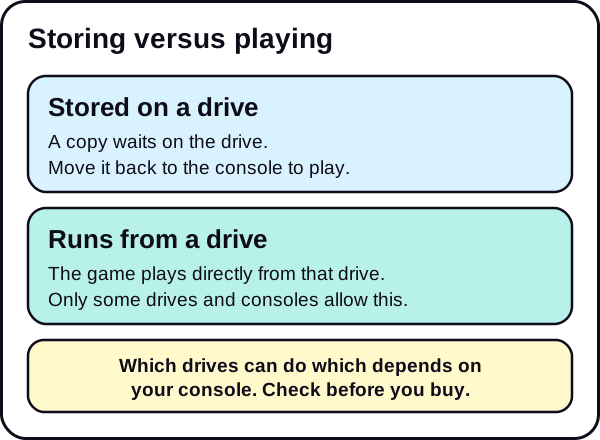
Storing versus playing
These two words matter more than any others here.
- Storing means a copy of the game sits on the drive. You can move it back to the console's main storage when you want to play it, which is faster than downloading it again.
- Playing means the game runs directly from the drive.
Most confusion comes from drives that can store a game but cannot run it.
PS5
The PS5 supports more than one kind of extra storage, and they behave differently.
- Internal M.2 SSD expansion. The PS5 has an expansion slot for a compatible M.2 SSD. According to Sony's support pages, PS5 games can be downloaded to it and played from it, along with PS4 games.
- USB extended storage. An external USB drive can be used as extended storage. PS5 games cannot be played directly from it: Sony says to copy the game data back to the console storage to play, and PS5 games cannot be downloaded straight to a USB drive. PS4 games can be played directly from USB extended storage.
That means that on PS5, the most future-proof approach for a new, large game is the internal slot.
Sony's drive requirements
These come from Sony's support pages for each drive type. Check them again before you buy, because system updates can change them.
- M.2 SSD: a PCIe Gen4 x4 NVMe SSD (Key M), 250 GB to 8 TB, in one of the supported lengths (2230, 2242, 2260, 2280 or 22110). M.2 SATA SSDs are not supported. A heatsink or similar cooling is mandatory, and Sony recommends sequential reads of 5,500 MB/s or faster.
- USB extended storage: a SuperSpeed USB drive of 5 Gbps or faster, from 250 GB to 8 TB. You cannot connect it through a USB hub, and only one extended storage drive works at a time.
Xbox Series X and Series S
Xbox works a little differently.
- Storage expansion card. Series X|S consoles support an official storage expansion card that plugs into the back. Microsoft's support page says games optimized for Xbox Series X|S must be installed on the internal SSD or on the expansion card.
- USB external drive. Microsoft says a USB 3.1 external drive can play Xbox One, Xbox 360 and original Xbox games, but not games optimized for Series X|S. Microsoft's launch guide to Xbox storage also describes using USB storage to hold Series X|S games and move them back when you want to play them.
What this means for GTA 6
Rockstar has not said whether GTA 6 has any special rules. So we can only point to the usual rules above. If GTA 6 follows them:
- On PS5, expect it to run from internal storage or a compatible M.2 SSD, with USB used for storing.
- On Xbox Series X|S, expect it to run from internal storage or the official expansion card, with USB used for storing.
We will update this page the moment Rockstar, Sony or Microsoft says otherwise. Do not buy an external hard drive only for GTA 6 until that is clear.
When an external drive still makes sense
A regular USB drive is useful even if it cannot run GTA 6:
- Move games you are not playing. Free internal space for GTA 6, and keep the others stored.
- Skip big redownloads. Moving a game back from a drive is usually faster than downloading it again.
- Back up captures. Copy screenshots and clips to the drive.
If your main goal is clearing space, see how in our guides for PS5 and Xbox Series X|S.
What to check before you buy any drive
- Console compatibility. Read the console maker's requirements for that drive type.
- Connection and speed. Use a drive that meets the requirements, and be careful about cheap options.
- Size. Pick a size with room to spare, since the GTA 6 size is unknown.
- Return policy. Keep the option to return it if the rules differ from what you expected.
If you want to see options, you can browse an external USB drive for storing games, a compatible M.2 SSD for PS5, or an Xbox storage expansion card. We may earn a commission from these links. See our affiliate disclosure.
Which option fits you?
Use this as a starting point, and confirm the current rules before you spend money.
| Your situation | A sensible first step |
|---|---|
| Your console is almost full and you own many games | Free space by moving games you are not playing to a USB drive |
| You want the best chance of playing a new, large game from extra storage on PS5 | Look at a compatible internal M.2 SSD, if you are comfortable opening the console |
| You want extra playable storage on Xbox Series X/S | Look at the official storage expansion card |
| You only want backups of captures and older games | A regular USB drive is enough |
| You are not sure | Wait for official GTA 6 details before buying |
How moving games between drives usually works
Moving a game from a USB drive back to the console is much faster than downloading it again, because it is a local copy. The usual flow is:
- Connect the drive to the console.
- Open the storage screen and find the game.
- Choose to move or copy it to the drive, or back to the console.
- Wait for the transfer. Large games can take a while, so do not turn off the console during the transfer.
This is why a plain USB drive is useful even if it cannot run GTA 6. You can park other games on it, free the internal space for GTA 6, and bring them back when you want them.
Why drive speed still matters
Even where a drive can run a game, a slower drive can mean longer loading. That is the main reason the consoles set requirements for the drives they will run new-generation games from. A cheap or slow drive can also be a poor fit for an internal slot. Always read the console maker's requirements for the exact drive type, and be careful with drives that do not state their specifications.
Common mistakes
- Buying a drive for a feature it does not have. A drive that can store games may not be able to run them.
- Assuming the rules for old games apply to new ones. Older console generations are treated differently from current ones.
- Buying before official details exist. If Rockstar or the console makers add rules for GTA 6, the best drive may change.
Start with the free option
Before you spend money, check how much space you already have. Our guide on how to check free storage on any PS5 or Xbox takes 30 seconds. Then read how much storage you need for GTA 6 on PS5 or the Xbox Series S guide to plan.
The short version
- Storing and playing are different. Many external drives only do the first.
- PS5: internal M.2 expansion can run PS5 games. USB can store them.
- Xbox Series X|S: the expansion card can run Series X|S games. USB can store them.
- Rockstar has not said anything specific about GTA 6. Wait for official details before buying.
See the Storage & Downloads hub and the GTA 6 setup checklist.
We update this guide when Rockstar confirms the file size.
Frequently asked questions
Can I play GTA 6 from a USB external hard drive on PS5?
Rockstar has not said. Under PS5 rules, PS5 games normally run from internal storage or a compatible internal M.2 SSD, and a USB drive is used to store them. Confirm for GTA 6 once it is announced.
Can I play GTA 6 from an external drive on Xbox Series X|S?
Series X|S games normally run from internal storage or the official storage expansion card. A regular USB drive can store them. Confirm for GTA 6 once Rockstar or Microsoft says more.
What is the difference between storing and playing?
Storing keeps a copy on the drive so you do not need to download it again. Playing means the game runs from that drive.
Should I buy a drive before launch?
Only if you are sure it will do what you need. Wait for official details if you can.