How to Move, Archive or Delete Games on PS5 to Save Space
When your PS5 is full, you have three tools: delete a game, move it to a USB drive to store it, or expand the console so more fits. This guide explains each, what it frees and what you give up. It is useful before the GTA 6 preload, which opens on November 12, 2026, with launch on November 19. Rockstar has not published an official install size, so room is worth making now.
See what takes the space
- Go to Settings from the home screen.
- Choose Storage.
- Choose Console Storage, then Games and Apps.
Look through the list for the games that take the most room. A few large games usually use most of it. Our guide on how to check free storage on any PS5 or Xbox shows the quick version.
Option 1: Delete
Deleting frees the most space and is the simplest fix.
- On the Games and Apps screen, choose the data you want to remove.
- Select Delete.
If a game shows Customize next to its title, you can delete only part of its data, such as add-ons you do not use or parts of the game you have already finished, and still play the rest.
Sony says you keep access to what you bought, so you can download a deleted game again from your game library. The cost is time and internet data.
Deleting a game versus deleting your saves
A game's saved data is kept separately from the game itself. Deleting the game does not by itself delete your saves, but check before you remove a game you care about.
Option 2: Move, to store a game on USB
A USB drive is a good place to store games you are not playing. This is the closest thing to archiving a game on PS5.
Sony is clear about the limit: PS5 games cannot be played directly from USB extended storage. You store them there and copy them back to the console storage to play. PS5 games also cannot be downloaded straight to a USB drive. PS4 games, however, can be played directly from USB extended storage.
Sony's requirements for the drive: a SuperSpeed USB drive of 5 Gbps or faster, from 250 GB to 8 TB. It cannot be connected through a USB hub, and only one extended storage drive works at a time.
To move a game, go to Settings, then Storage, and open USB Extended Storage. From there you can manage the games stored on the drive.
Moving a game back is faster than downloading it again, because it is a local copy. Read our guide to external drives on PS5 and Xbox for the full picture.
Option 3: Expand with an M.2 SSD
An internal M.2 SSD changes the picture. Sony says PS5 games can be downloaded to a compatible M.2 SSD and played from it, along with PS4 games. So an SSD gives you playable space, which a USB drive does not.
It must meet Sony's requirements, with cooling. See our guide to the best M.2 SSDs for PS5 and our step-by-step guide to installing an M.2 SSD in a PS5.
Which one to use
| Action | Frees internal space | Playable afterwards | You may need to download again |
|---|---|---|---|
| Delete | Yes | Only after you download again | Yes |
| Move to USB | Yes | Only after you copy it back | No |
| Add an M.2 SSD | Adds space | Yes, straight away | No |
A simple rule:
- Games you have finished: delete.
- Games you will play again soon: move them to USB.
- You want more playable room: add an M.2 SSD.
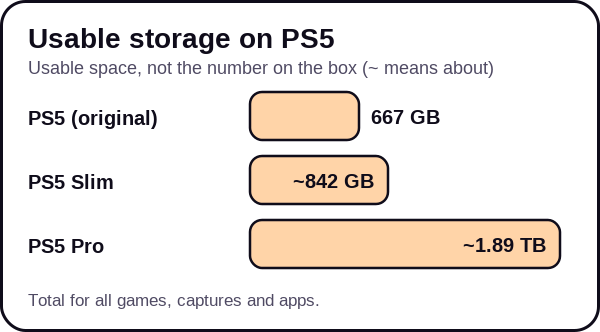
How much room do you start with?
| PS5 model | Usable storage |
|---|---|
| PS5 (original) | 667 GB |
| PS5 Slim | about 842 GB |
| PS5 Pro | about 1.89 TB |
A calm order for a full console
- Delete the biggest games you have finished.
- Back up and delete captures. Our guide on clearing space on PS5 before the GTA 6 preload covers this in order.
- Move games you will play again to a USB drive.
- Think about an M.2 SSD if you still need playable room.
If the console already shows an error when you install, see PS5 "not enough free space" error: what it means and how to fix it.
The short version
- Settings, Storage, Console Storage, Games and Apps shows what takes space, and lets you delete games or parts of them.
- A USB drive stores PS5 games but cannot run them. An M.2 SSD can run them.
- Deleting does not delete your purchase, and you can download the game again.
- Rockstar has not published the GTA 6 size, so make room before November 12.
See our Storage & Downloads hub and the GTA 6 setup checklist.
Sources
- PlayStation Support: How to manage storage space on your PS5 console
- PlayStation Support: USB extended storage on PS5 consoles
- PlayStation Support: How to add an M.2 SSD to a PS5 console
Official pages consulted on October 22, 2026.
We update this guide when Sony changes these steps.
Frequently asked questions
Can I play PS5 games from a USB drive?
No. Sony says PS5 games cannot be played from USB extended storage. You can store them there and copy them back to the console to play. PS4 games can run from USB.
Does deleting a game delete my saved games?
Saved data is kept separately from the game on the console. Check that your saves are safe before you delete a game you care about.
Can I download a deleted game again?
Yes. Sony says you keep access to what you bought, so you can download it again from your game library.
What can I delete without removing the whole game?
If a game shows Customize, you can delete only part of its data, such as add-ons you do not use.